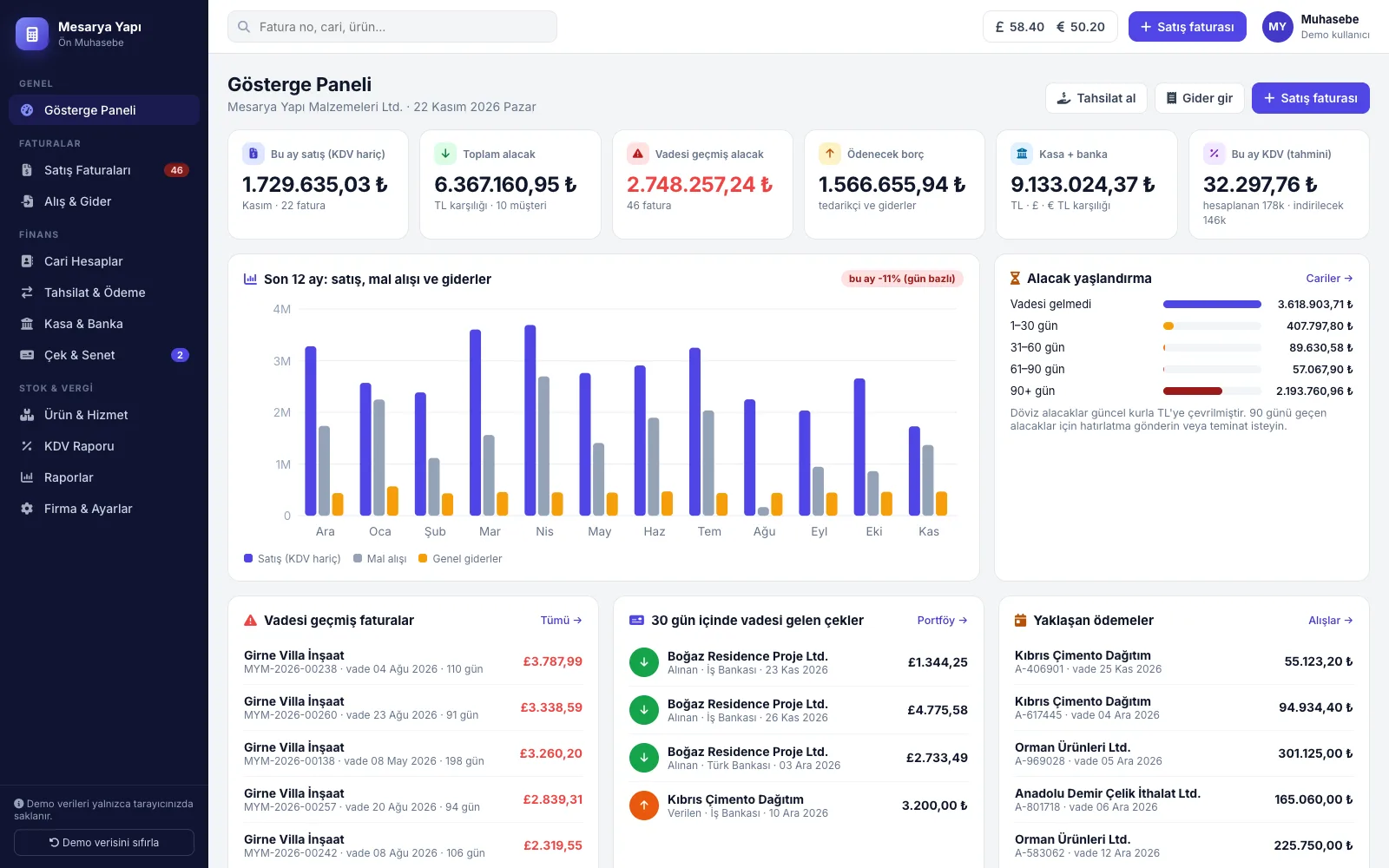
Invoices, customer accounts, cash and bank, and VAT on one screen.
Sales and purchase invoices (with e-invoice fields), customer accounts and due-date tracking, collections, TL/£/€ cash and bank, cheques, VAT report and export for your accountant.
What does this service provide?
When invoices are in Word, customer accounts in Excel, cheques in a notebook and VAT is worked out by the accountant at month end, it is impossible to see at a glance who owes how much and how much VAT is due this month. Bookkeeping software brings all of this together on one screen.
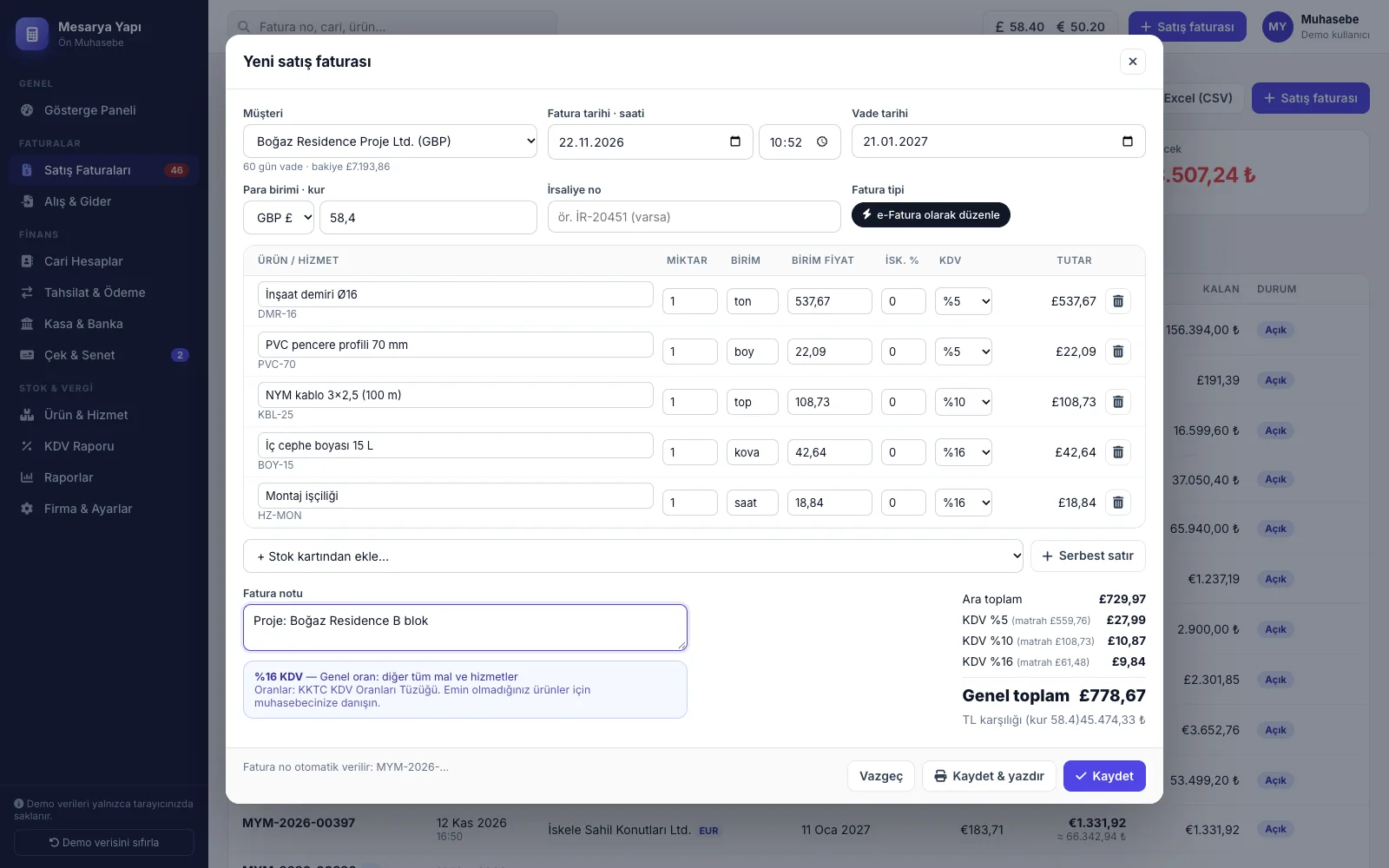
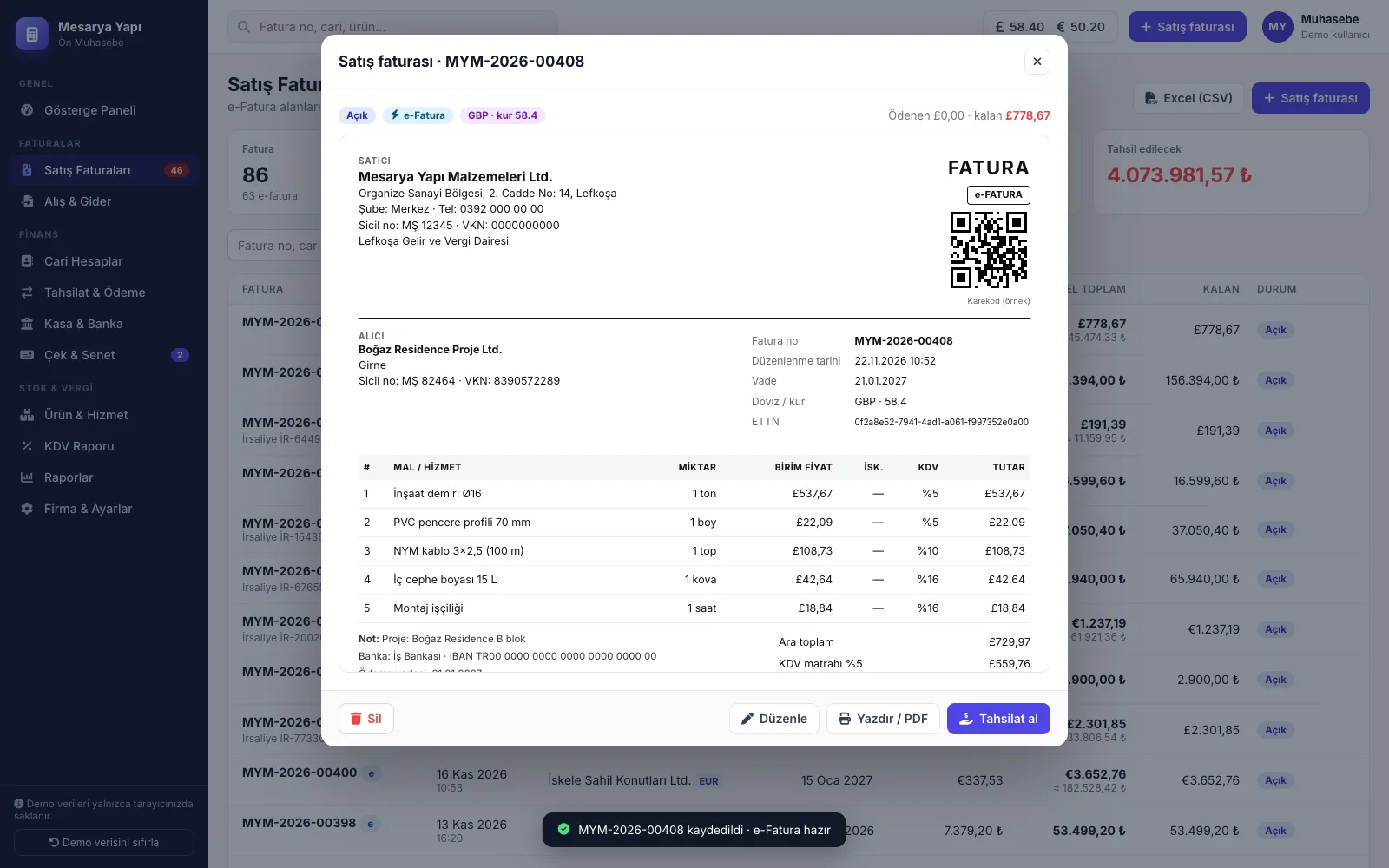
A sales invoice takes a few clicks: price and VAT rate (0%, 5%, 10%, 16% or 20%) come automatically from the product card, and different rates on the same invoice are totalled separately. The invoice is prepared with e-invoice fields such as date and time, registration number, tax ID, delivery note number and QR code, and can be printed on A4 or saved as PDF.
If, as is common in North Cyprus, you work with some customers in sterling or euro, their accounts are kept in their own currency; reports show the TL equivalent at the invoice-date rate. Cash, bank and POS accounts are kept separately in TL, £ and €; currency exchanges and transfers between accounts are recorded.
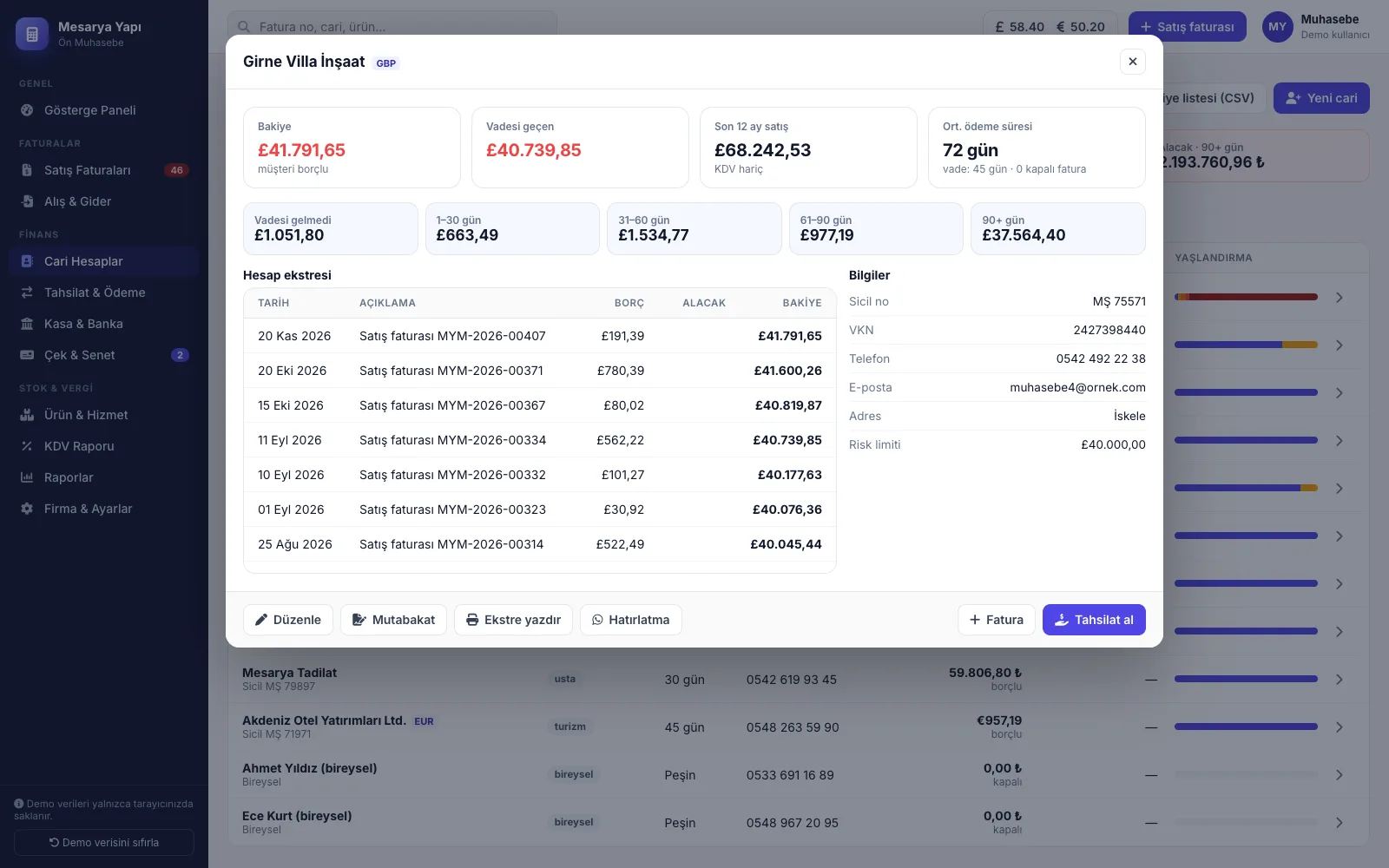
Each customer's balance, overdue amount and 30-60-90 day ageing are visible. When a payment is entered, it is matched automatically starting from the oldest invoice. Cheques received are tracked in the portfolio by due date, deposited at the bank or endorsed to a supplier. A WhatsApp reminder to an overdue customer and an account reconciliation letter are prepared in one click.
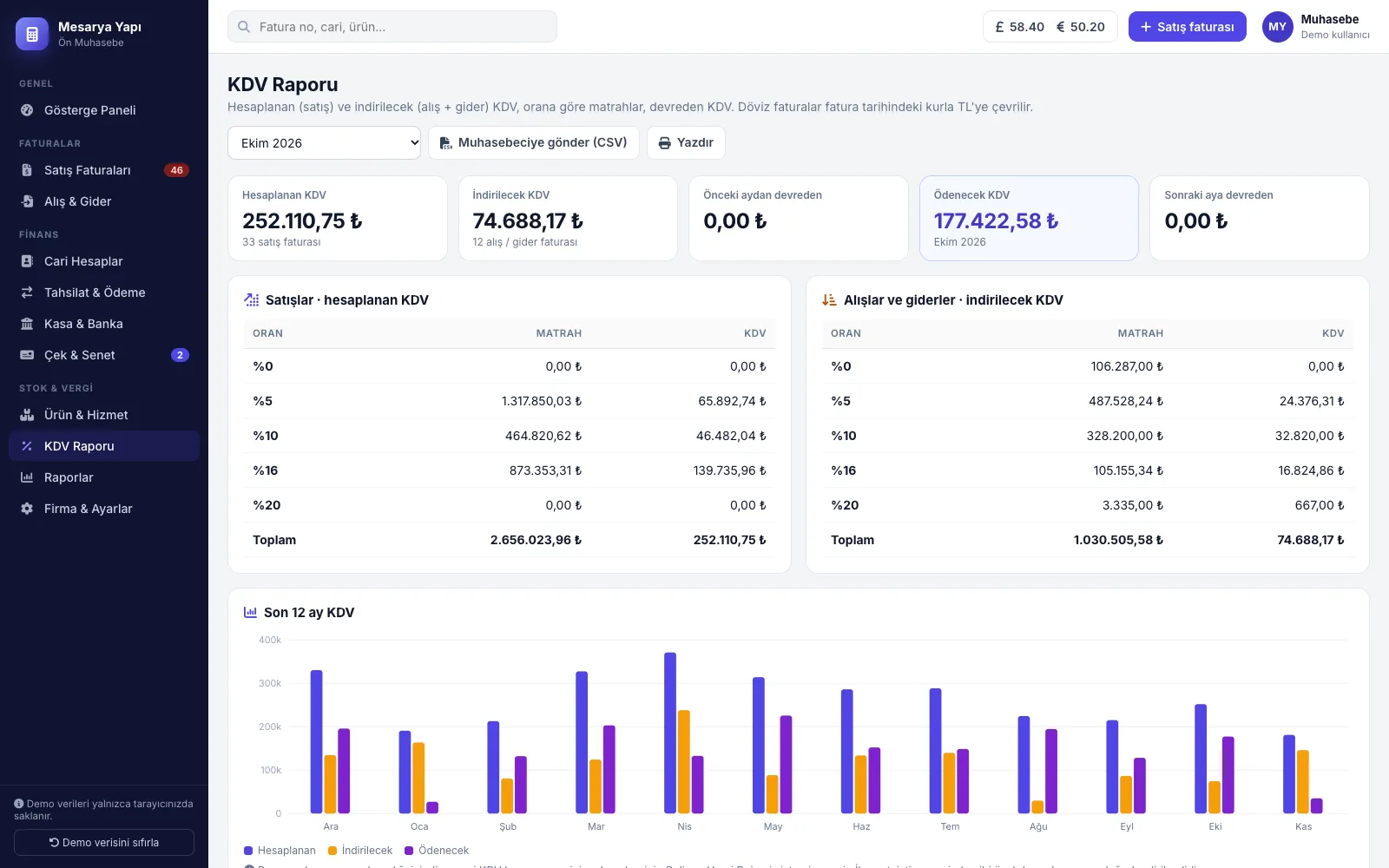
At month end, output and input VAT are ready, split by rate; the summary including VAT carried forward and the invoice list are sent to your accountant in Excel. The income statement, expense breakdown and 8-week cash flow forecast make decisions easier for management.
What's included?
- Sales invoices with e-invoice fields and A4 printout
- 0% / 5% / 10% / 16% / 20% VAT rates
- Customer accounts, due dates and 30-60-90 day ageing
- TL, sterling and euro accounts
- Collections, payments and automatic invoice matching
- Cheque and promissory note portfolio, collection and endorsement
- VAT report and Excel export for your accountant
- Income statement and cash flow forecast
Key features
Modules you can choose and combine to suit your business.
Invoices with e-invoice fields
Invoices with date-time, registration no., tax ID, delivery note no. and QR code; A4 printing and PDF.
North Cyprus VAT rates
0%, 5%, 10%, 16% and 20%; different rates on the same invoice are totalled with separate taxable amounts.
Customer accounts & ageing
Balance, overdue amount, 30-60-90 day ageing, statements and credit limit warnings.
TL, sterling and euro
Foreign currency accounts in their own currency; reports show the TL equivalent at the invoice-date rate.
Cash, bank & POS
Balance and movements per account; transfers, currency exchange and moving POS takings to the bank.
Cheques & promissory notes
Portfolio of cheques received, due-date calendar, collection, endorsement to suppliers and bounced cheque records.
Reminders & reconciliation
WhatsApp/SMS reminders to overdue customers; an account reconciliation letter in one click.
VAT and management reports
Monthly VAT summary, VAT carried forward, income statement, expense breakdown and cash flow forecast.
Examples from real screens
Screenshots from systems we have built. Click an image to enlarge it.
How do we work?
Clear steps, with your approval at every stage.
Opening balances
Company details, invoice series, cash and bank accounts and opening balances are entered.
Transfer
The customer list, open invoices, product cards and cheques in the portfolio are imported from Excel.
Go-live
The invoice template and the export format for your accountant are set up, and the team gets short training.
Who is it for?
The types of business that use this solution most.
Frequently asked questions
Can I try the demo?
Yes. Using a year of data from a sample building materials company, you can issue a sales invoice, take payment by cheque, deposit the cheque at the bank and review the VAT report. The data is kept only in your browser.
Is e-invoicing mandatory in North Cyprus?
It is currently optional. From 1 January 2027 it becomes mandatory for businesses with a 2025 turnover of 2 billion TL or more. The software prepares the invoice template with e-invoice fields; the connection to the official system is configured during setup.
Which VAT rates are there?
0%, 5%, 10%, 16% (the general rate) and 20%. The rate is set once on the product card and appears automatically on the invoice; different rates on the same invoice are totalled separately.
I have customers who pay in sterling and euro. Is that a problem?
No. The customer account and invoice are kept in the foreign currency and the rate is shown on the invoice; the VAT report and management reports are converted to TL at the invoice-date rate.
How does it work with my accountant?
At month end, sales and purchase invoices and the VAT summary are exported to Excel (CSV) and sent to your accountant. The export format can be set to match the software your accountant uses.
Let's plan your project together
Let us listen to your needs and come back with a working demo and a clear quote.